Tabber
What is Tabber?
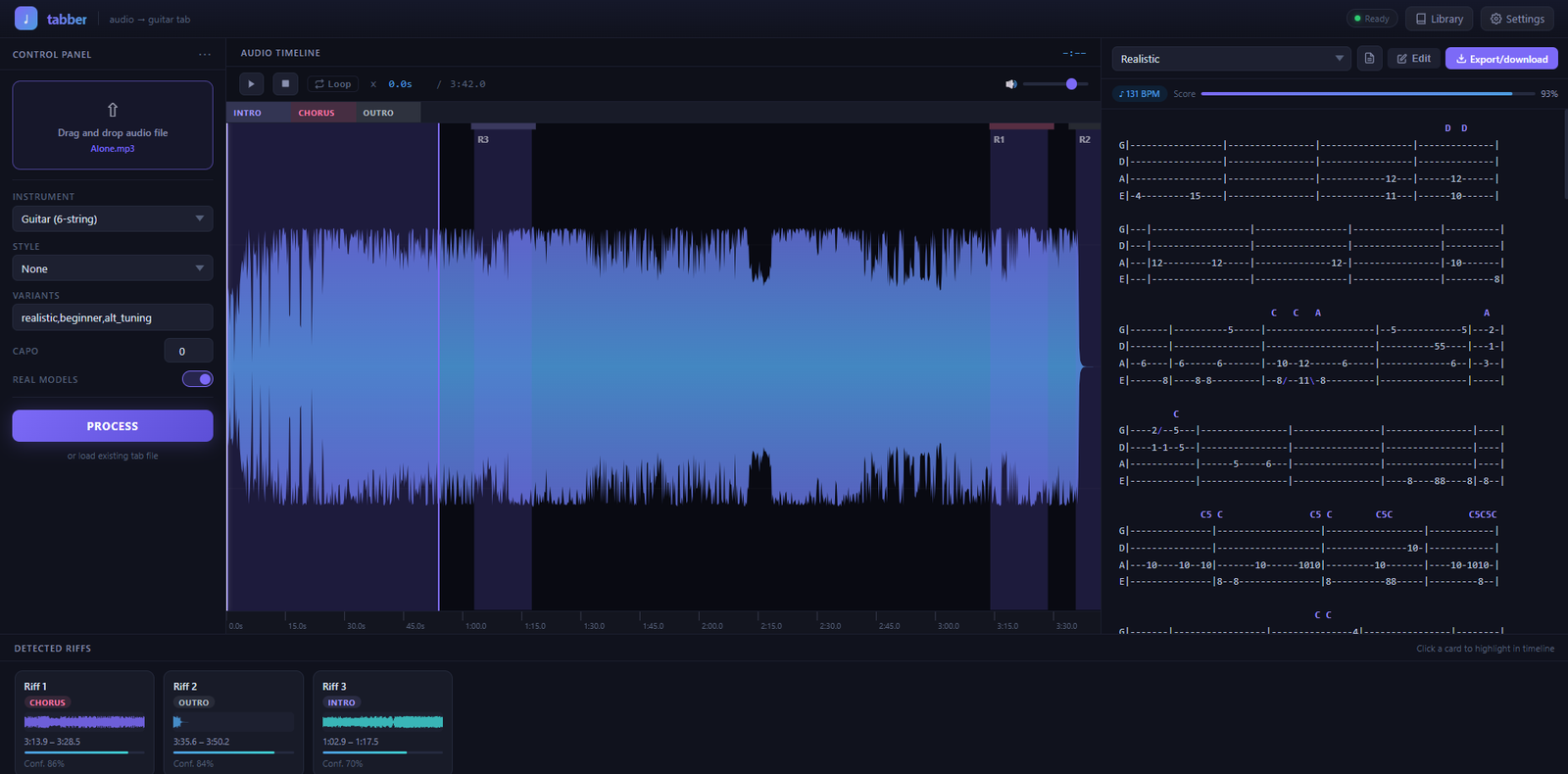
Tabber is an audio-to-tab tool by ElastikMind. Drop in any audio file — a full song, a stem, a riff recording — and Tabber separates it into instrument stems, transcribes the notes, and generates playable guitar or bass tabs in seconds. All processing runs locally on your machine; no audio is sent to the cloud.
How It Works
Tabber runs a five-stage pipeline automatically:
- Separation — splits your audio into vocals, drums, bass, and other (guitar/keys) using the Demucs deep-learning model.
- Transcription — converts each stem to MIDI using Basic Pitch, a neural transcription model built by Spotify.
- Interpretation — maps MIDI pitches to real fretboard positions, applies playability constraints, and generates voicings shaped by genre rules (punk, metalcore, math-rock, and more).
- Tab generation — produces multiple tab variants so you can pick the one that fits your skill level: Beginner (open strings, low frets), Realistic (movement-minimised fingering), and Alt Tuning (drop D, open E, and others).
- Export — saves Guitar Pro–compatible files and ASCII tab, with chord names shown above each line.
Key Features
- Drag-and-drop web interface — no command line required for everyday use.
- Three tab difficulty variants generated simultaneously per song.
- Chord names detected and labelled above every tab line.
- Playback-to-tab sync — the active line highlights as your audio plays.
- Riff extraction — repeated motifs are automatically detected and ranked so you can loop and study them.
- Guitar Pro export (.gp5 compatible) for use in Guitar Pro, TuxGuitar, and similar tools.
- Song library — previously processed songs are saved and instantly reloadable.
- Fallback mode — fully functional without the heavy ML models for quick demos or low-spec machines.
- Apple Silicon aware — MPS-accelerated processing on M1/M2/M3 Macs.
- NVIDIA GPU support — CUDA acceleration for 5–20× faster stem separation.
Minimum System Requirements
All Platforms
- Python 3.10, 3.11, 3.12, or 3.13
- FFmpeg 7.x or 8.x installed and available on your system PATH
Windows
- Windows 10 64-bit or later
- 4-core x86-64 CPU
- 8 GB RAM (16 GB recommended for real-model processing)
- 3 GB free disk space (5 GB when the full ML stack is installed)
macOS
- macOS 12 Monterey or later
- Intel or Apple Silicon (M1/M2/M3)
- 8 GB RAM (16 GB recommended)
- 5 GB free disk space
Linux
- Any modern x86-64 distribution
- 8 GB RAM (16 GB recommended)
- 5 GB free disk space
Optional: GPU Acceleration
- NVIDIA GPU with 6 GB or more VRAM
- CUDA 12 drivers
- Reduces stem separation time from 30–90 seconds (CPU) to 10–30 seconds per track
Processing Speed
Approximate processing time for a 3–4 minute song:
- Fallback mode (no ML models): under 5 seconds
- CPU, 8-core (htdemucs): 30–90 seconds
- CPU, 8-core (htdemucs_ft, highest quality): 1–3 minutes
- NVIDIA GPU: 10–30 seconds
Installation
Windows
- Install Python 3.10+ — check “Add Python to PATH” during setup.
- Install FFmpeg: open a terminal and run
winget install Gyan.FFmpeg - Download and extract Tabber-Setup-Windows.zip.
- Double-click Install.bat. The installer creates a private environment, downloads the ML stack (~2 GB on first run), and places a Tabber shortcut on your Desktop.
- Double-click the Desktop shortcut. The app opens in your browser at
http://127.0.0.1:8000.
macOS
- Install Python 3.10+ or run
brew install python@3.13. - Install FFmpeg:
brew install ffmpeg - Download and extract Tabber-Setup-Mac.zip.
- Open Terminal, navigate to the extracted folder, and run:
bash install-mac.sh - When complete, double-click Tabber.command on your Desktop. The app opens at
http://127.0.0.1:8000.
To skip the ~2 GB ML download and run in demo mode only, add the --skip-models flag: bash install-mac.sh --skip-models
Uninstall
Windows: Delete the Desktop shortcut and the folder %LOCALAPPDATA%\Tabber.
macOS: Delete ~/Library/Application Support/Tabber, /usr/local/bin/tabber, and ~/Desktop/Tabber.command.
$10.00