
Professional Audio Tools That Adapt to Your Creative Process
StemTabber is now on the Web
Separate any song into individual stems — vocals, drums, bass, guitar & more — right in your browser. No downloads, no installs. Just drop a track and go.
Free to use • Works in Chrome, Safari & Firefox
Our Professional Audio Tools
Browse our collection of professional audio plugins
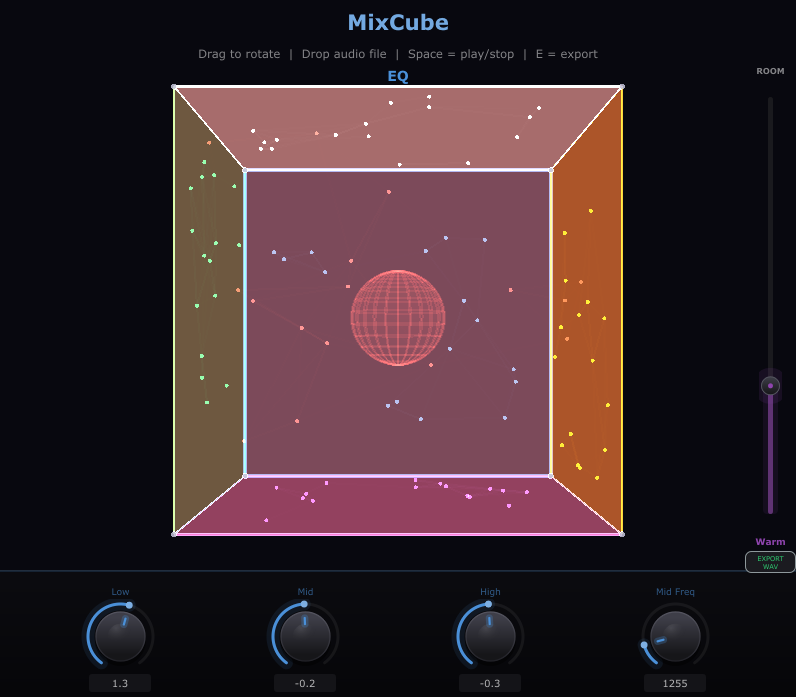
MixCube
$10.00MixCube – Virtual Mono Reference Speaker for Desktop
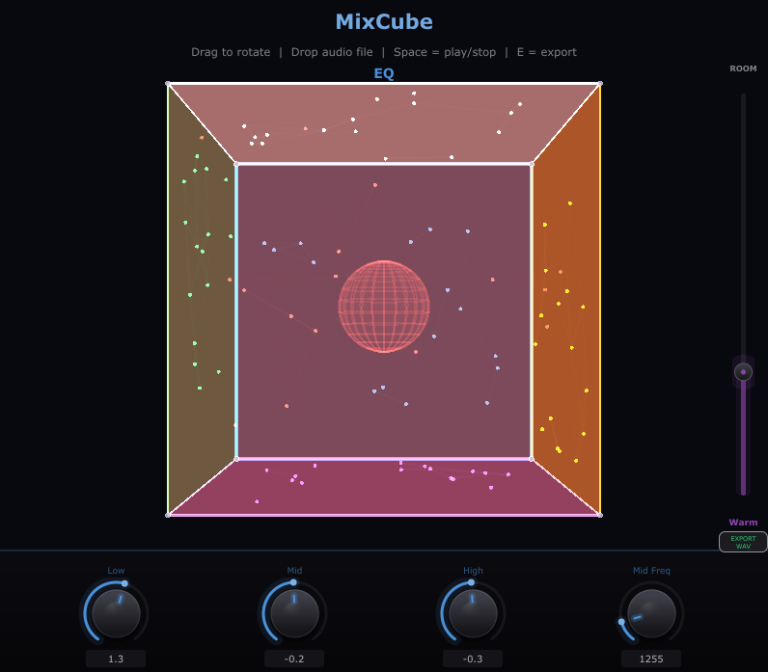
MixCube is a standalone desktop application that emulates the frequency response of a classic Auratone-style cube reference monitor. It lets you check how your mix translates on small, band-limited speakers without needing physical hardware—no plugin hosting or DAW required.
What Is MixCube?
MixCube is a lightweight standalone application for Windows and macOS built with the JUCE framework. It processes your system audio or routed output through a carefully shaped frequency curve that mimics the narrow bandwidth and midrange-focused character of a classic mono cube speaker. Launch the app, route your audio through it, and instantly hear what your mix sounds like on a limited-range playback system.
Why Use MixCube?
Professional mix engineers have relied on small reference monitors for decades. These speakers strip away the extended lows and highs, exposing the core of a mix: vocals, snare, bass guitar, and other midrange elements. If your mix sounds good on a cube speaker, it will translate well on phone speakers, laptop speakers, car stereos, and cheap earbuds.
MixCube gives you this reference point without buying dedicated hardware. It is especially useful for:
- Checking vocal and dialogue clarity against the instrumental balance
- Evaluating bass-to-kick drum relationships in the midrange
- Identifying masking problems between competing elements
- Testing mono compatibility of stereo mixes
- Simulating consumer playback devices during mixing and mastering
How to Use MixCube
- Download and install MixCube on Windows or macOS.
- Launch the application from your desktop or start menu.
- Select your audio input and output devices within the app.
- Route your DAW output or any audio source into MixCube.
- Listen through the cube speaker emulation and make mixing decisions based on what you hear.
- Toggle the emulation on and off to compare against your full-range monitoring at any time.
Because MixCube runs as a standalone application, it works alongside any DAW, media player, or audio source on your system. There is nothing to configure inside your DAW and no plugin format compatibility to worry about.
When to Use MixCube
Use MixCube at multiple stages of your workflow:
- During rough mixing – Establish a solid balance of core elements early by referencing through the cube emulation.
- While setting vocal levels – The restricted bandwidth makes it immediately obvious whether vocals sit correctly in the mix.
- Before finalizing a mix – Do a last-pass check to confirm your mix translates on limited playback systems.
- During mastering – Verify that the mastered track retains clarity and balance on small speakers.
- While reviewing rough cuts or demos – Quickly assess any audio playing on your computer without opening a DAW.
Key Features
- Auratone-style frequency response emulation
- Standalone desktop application—no DAW or plugin host required
- Available for Windows and macOS
- Lightweight with minimal CPU usage
- Simple interface with no unnecessary controls
System Requirements
- Windows 10 or later (64-bit) or macOS 10.13 or later
- An audio interface or built-in sound device
Get Started
Download the MixCube installer for Windows or macOS, install the application, and start referencing your mixes on a virtual cube speaker today.
DrumJuic3
$10.00The Pie Knob Control
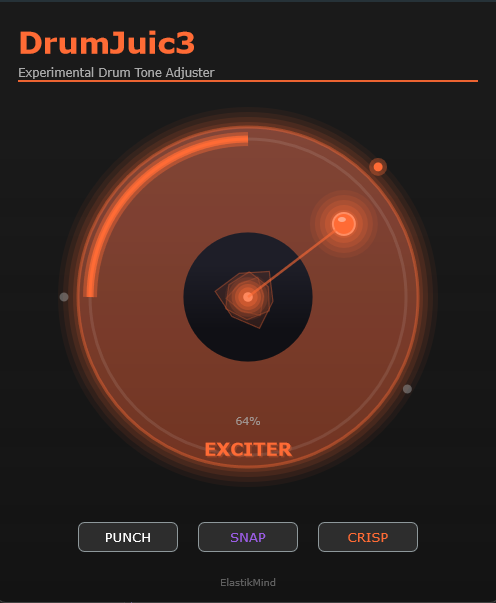
Revolutionary single-control interface. Angle selects your effect type. Radius controls intensity. It’s that simple.
Six Effect Zones
EXCITER
Harmonic enhancement for brightness and air. Perfect for adding shimmer to hi-hats and cymbals.
0° – 90° | Orange Zone
SOFT SAT
Tape-style warm saturation. Adds analog character and smooth compression to your drums.
90° – 135° | Purple Zone
HARD CLIP
Aggressive clipping for edge and bite. When you need your snare to cut through the mix.
135° – 180° | Purple → Yellow Zone
TUBE
Tube amplifier distortion warmth. Classic overdrive character with musical harmonics.
180° – 225° | Yellow Zone
THUMP
Low-end emphasis + transient shaping + sub-harmonic generation. Makes kicks hit harder.
225° – 315° | Cyan Zone
BITCRUSH
Lo-fi sample rate & bit depth modulation. Perfect for experimental and retro drum sounds.
315° – 360° | Cyan → Orange Zone
Instant Presets
- PUNCH — Heavy thump for kicks (270° @ 70%)
- SNAP — Crisp saturation for snares (120° @ 50%)
- CRISP — Bright exciter for hi-hats (45° @ 60%)
Audio-Reactive Visualizer
The crystalline center pulses and rotates in sync with your audio. Watch it glow in the color of your current effect zone. It’s not just a plugin—it’s an experience.
- Responds to RMS and peak levels in real-time
- Zone-colored glow changes with current effect
Specifications
| Formats | VST3, AU, AAX, Standalone |
| Platforms | Windows 10+ / macOS 10+ |
| Requirements | 4GB RAM, 100MB disk space |
| Latency | Zero-latency processing |
| Window Size | 500 × 600 pixels |
About DrumJuic3
DrumJuic3 reimagines drum processing for the modern producer. Our innovative Pie Knob™ control lets you seamlessly morph between six distinct effect zones—from bright harmonic excitement to crushing lo-fi destruction—all with a single intuitive gesture.
The audio-reactive crystalline visualizer provides instant feedback, glowing and pulsing in sync with your drums. Whether you’re adding subtle punch to a kick, crisp snap to a snare, or experimental bitcrushed textures to your entire kit, DrumJuic3 gets you there faster than any traditional plugin.
Three instant presets (Punch, Snap, Crisp) give you professional starting points, while the continuous control lets you dial in exactly the tone you hear in your head.
Simple enough for beginners. Powerful enough for pros. Beautiful enough to inspire.
TimeTapeDelay
$10.00Features
Authentic Tape Emulation
Experience the rich, saturated sound of real magnetic tape. Our advanced DSP algorithms model the frequency-dependent saturation, hysteresis, and natural compression that made tape delays legendary.
Glowing Tube Saturation
A meticulously modeled triode tube stage adds harmonic richness and dynamic compression. Drive it subtle for warmth, or push it hard for thick, saturated character.
Wow & Flutter Modulation
Real tape machines weren’t perfect—and that’s what made them beautiful. Our age-dependent modulation system adds authentic pitch variation and mechanical character that breathes life into your delays.
Tape Age Control
Turn back time with our unique Tape Age parameter. From pristine “New” tape to beautifully worn “Vintage” and gritty “Worn” character—dial in exactly the amount of analog mojo you need.
Intelligent Feedback Filter
Authentic frequency-dependent feedback that evolves with the Tape Age setting. Watch your delays naturally roll off high frequencies, just like real tape machines.
Stereo Enhancement
Create expansive stereo delays with variable width control, or engage Ping-Pong mode for classic bouncing echoes between left and right channels.
Intuitive Controls
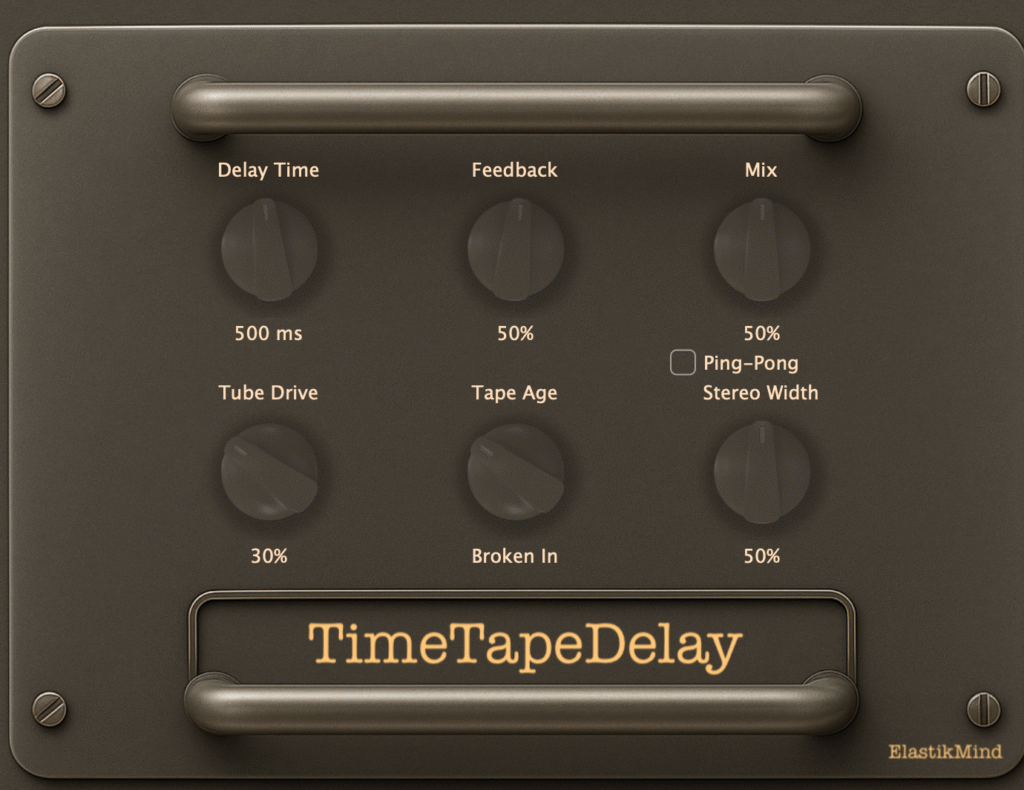
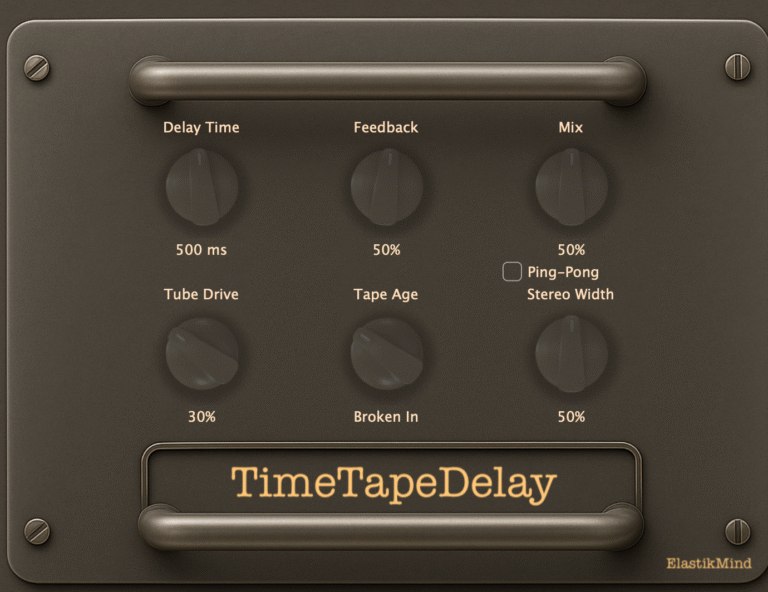
- Delay Time: 50ms – 2000ms of perfectly timed delays
- Feedback: Up to 95% for infinite tape loops
- Mix: Blend dry and delayed signals to taste
- Tube Drive: 0–100% tube saturation intensity
- Tape Age: New → Broken In → Vintage → Worn character
- Stereo Width: Mono to ultra-wide stereo field
- Ping-Pong: Toggle bouncing stereo delays
Perfect For
Guitars
Add vintage slapback or lush ambient delays. Push the tube saturation for thick, creamy leads that sit perfectly in the mix.
Vocals
Create warm, musical delays that add space without getting muddy. The tape saturation naturally tames harsh sibilance.
Drums
From tight rockabilly slapback to expansive dub echoes. The tape compression keeps transients controlled and musical.
Synths
Add warmth and character to digital synths. The tape modulation creates organic movement and vintage vibe.
Mix Bus
Use subtly as a mix-wide effect for cohesive vintage character. The tape emulation glues elements together beautifully.
Technical Specifications
| Formats | VST3, Audio Unit (AU) |
| Platform | macOS 10.13+ (Apple Silicon & Intel) |
| Processing | High-quality 64-bit audio processing |
| Latency | Ultra-low for real-time performance |
| Oversampling | Optional 2x for alias-free saturation |
| CPU Usage | Highly optimized, minimal CPU usage |
Quick Start Presets
- Slapback — Classic 50s rockabilly echo (Delay: 120ms | Feedback: 15% | Tape Age: New)
- Ambient Wash — Lush, dreamy delays (Delay: 500ms | Feedback: 70% | Tape Age: Vintage | Width: 100%)
- Dub Echo — Classic reggae delays (Delay: 375ms | Feedback: 85% | Ping-Pong: On | Age: Worn)
- Lead Vocal Thickener — Subtle doubling effect (Delay: 80ms | Feedback: 20% | Mix: 25% | Drive: 40%)
- Psychedelic Swirl — Wild modulated delays (Delay: 650ms | Feedback: 75% | Age: Worn | Width: 100%)
Why Choose TimeTapeDelay?
- Authentic Sound — True analog modeling, not just a digital delay with filters
- Musical Character — Every parameter is designed to enhance, not overwhelm
- CPU Efficient — Professional quality without the CPU drain
- Beautiful Interface — Vintage aesthetic with modern workflow
- Lifetime Updates — Buy once, enjoy forever
reVerb
$10.00Elevate Your Sound
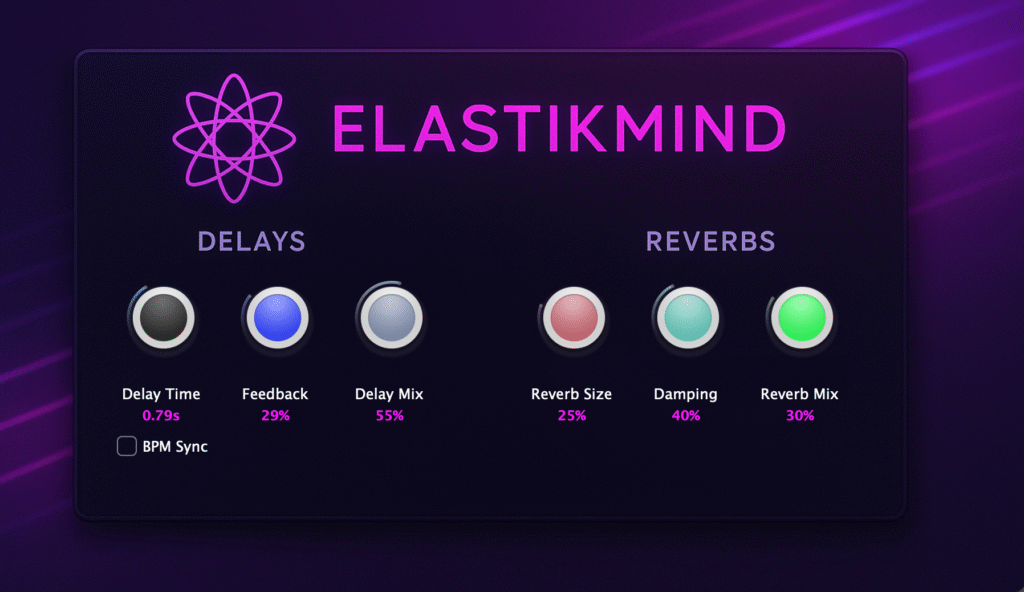
reVerb is a professional-grade VST3 audio plugin that combines pristine delay and lush reverb processing into one powerful, intuitive package. Designed by ElastikMind, reVerb delivers studio-quality spatial effects that bring depth, dimension, and character to any production.
Whether you’re a music producer crafting the next hit, a sound designer creating immersive soundscapes, or a mix engineer adding the perfect finishing touches, reVerb provides the tools you need with an interface that’s both beautiful and functional.
Perfect for: Vocals, guitars, synths, drums, sound design, ambient music, electronic production, post-production, and more.
Key Features
Precision Delay Engine
Ultra-clean delay processing with up to 2 seconds of delay time, featuring smooth parameter interpolation for artifact-free modulation.
Lush Reverb Algorithm
Rich, natural-sounding reverb based on proven algorithms that add space and depth without muddying your mix.
Elegant Custom UI
Stunning visual interface with custom image-based rotary knobs and a beautiful gradient background that’s both inspiring and functional.
BPM Sync Capability
Lock your delay times to your project tempo for perfectly synchronized rhythmic effects.
Intuitive Controls
All parameters clearly labeled with real-time value displays in meaningful units (seconds, percentages) for precise adjustments.
Native Preset System
Full VST3 preset support for saving and recalling your favorite settings instantly.
Comprehensive Parameter Set
Delay Section
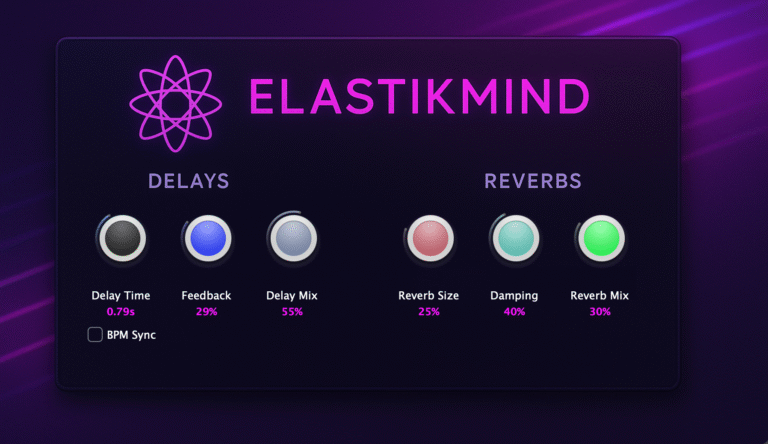
- Delay Time (0.0s – 2.0s) — Sets the delay time in seconds. Perfect for everything from slapback echoes to long atmospheric delays.
- Feedback (0% – 95%) — Controls the number of delay repeats. Lower values create subtle echoes, higher values produce evolving textures.
- Delay Mix (0% – 100%) — Blends the delayed signal with the dry input. Allows for everything from subtle depth to 100% wet effects.
Reverb Section
- Reverb Size (0% – 100%) — Adjusts the size of the virtual space, from tight rooms to expansive halls and beyond.
- Damping (0% – 100%) — Controls high-frequency absorption in the reverb tail. Higher values create warmer, more natural-sounding spaces.
- Reverb Mix (0% – 100%) — Blends the reverb signal with the dry input. Perfect for dialing in just the right amount of ambience.
Additional Controls
BPM Sync — Toggle button for synchronizing delay times to your DAW’s tempo. Enable for rhythmic effects that stay perfectly in time with your music.
Technical Specifications
| Format | VST3 (64-bit) |
| Compatibility | macOS 10.13 or later (Intel & Apple Silicon) |
| Architecture | Universal Binary (x86_64 + ARM64) |
| Processing | 32-bit floating point, sample accurate |
| Latency | Zero latency |
| CPU Usage | Optimized for minimal CPU load |
| Preset Management | Full VST3 native preset support |
| Automation | All parameters fully automatable |
| Sample Rates | 44.1 kHz – 192 kHz |
| GUI | High-resolution custom interface (900×520) |
Perfect for Your Workflow
reVerb seamlessly integrates into any modern DAW that supports VST3 plugins:
- Ableton Live — Perfect for electronic music and live performance
- Logic Pro — Native macOS integration for seamless operation
- FL Studio — Ideal for beat making and production
- Cubase / Nuendo — Professional studio-grade compatibility
- Studio One — Modern workflow integration
- Reaper — Lightweight and efficient performance
reVerb delivers consistent, high-quality results across all platforms.
Creative Applications
Music Production
Add professional depth and dimension to your mixes. Use the delay for creating rhythmic interest and the reverb for placing sounds in a cohesive space. Perfect for everything from pop to electronic to ambient music.
Vocal Processing
Enhance vocal performances with subtle room ambience or create dramatic effects with longer reverb tails and synced delays. The precise control over parameters ensures vocals sit perfectly in your mix.
Sound Design
Create evolving textures, atmospheric pads, and otherworldly effects. Push the feedback parameter for experimental sounds, or use subtle settings for realistic spatial enhancement.
Mixing & Mastering
Use reVerb as a professional mixing tool to add polish and dimension to individual tracks or complete mixes. The clean processing ensures transparency while adding the perfect amount of space.
The ElastikMind Difference
Designed with producers in mind, reVerb combines powerful processing with an interface that inspires creativity. Every knob turn is smooth, every parameter change is musical, and the visual feedback keeps you in the flow.
Unlike generic plugins with cluttered interfaces, reVerb focuses on what matters most: delivering exceptional sound with controls that are both powerful and easy to use.
- Professional Quality
- Beautiful Design
- Intuitive Workflow
- Zero Latency
- Universal Binary
- Future-Proof
System Requirements
| Operating System | macOS 10.13 (High Sierra) or later |
| Processor | Intel or Apple Silicon (M1/M2/M3) |
| RAM | 4 GB minimum (8 GB recommended) |
| Plugin Format | VST3 (64-bit only) |
| Display | 1280×720 or higher resolution |
| DAW | Any VST3-compatible host application |
iOS Apps for Musicians
Professional tools in your pocket

StickPulse
FreeMaster Your Drum Timing with Precision Feedback
Real-time timing analysis that shows you exactly where your drumming needs work — color-coded feedback, 40 rudiment patterns, millisecond-accurate scoring, and detailed session analytics.
Key Features
- Real-time color-coded timing feedback (green/orange/red)
- 40 essential rudiment patterns with music notation
- Precision metronome (40–300 BPM)
- Session recording & detailed analysis
- On-device processing — no internet required

StemTabber
From $2.99/moAI-Powered Audio Stem Separation
Transform any song into individual stems with advanced AI. Perfect for musicians, producers, DJs, and music enthusiasts who want complete control over their audio.
Key Features
- AI stem separation — vocals, drums, bass, guitar, piano
- Interactive mixing with solo, mute, and volume control
- Automatic chord detection synced to playback
- Speed control without pitch change
- Export individual stems or custom mixes
Why Choose ElastikMind
Innovation Focus
We don't just make plugins - we solve real production challenges with cutting-edge technology
Quality Standards
Professional-grade DSP with broadcast-quality results in every plugin
User-Centric Design
Intuitive interfaces that speed up creative decisions and inspire workflow
Cross-Platform
Seamless integration with Logic Pro, Ableton Live, Cubase, Reaper, and more
Get Our Tools
Audio plugins & iOS apps — everything you need to create, practice, and perform.
MixCube
MixCube – Virtual Mono Reference Speaker for Desktop MixCube is a standalone desktop application that emulates the frequency response of…
DrumJuic3
The Pie Knob Control Revolutionary single-control interface. Angle selects your effect type. Radius controls intensity. It's that simple. Six Effect…
TimeTapeDelay
Features Authentic Tape Emulation Experience the rich, saturated sound of real magnetic tape. Our advanced DSP algorithms model the frequency-dependent…
reVerb
Elevate Your Sound reVerb is a professional-grade VST3 audio plugin that combines pristine delay and lush reverb processing into one…
StickPulse
Real-time drum timing analysis with color-coded feedback, 40 rudiments, and session analytics.
StemTabber
AI-powered stem separation — isolate vocals, drums, bass, guitar & piano from any song.
About ElastikMind
ElastikMind creates intelligent audio tools that adapt to your creative process, eliminating technical barriers so you can focus on making great music.
Our team combines decades of audio engineering experience with cutting-edge DSP research to develop plugins that don't just process audio they understand it.
From VoxSweet's intelligent vocal processing to MasterSweet's synthwave mastering suite, we're building a complete ecosystem of professional audio tools.
Coming Soon
We're expanding the ElastikMind ecosystem with intelligent tools for every aspect of music production.
Stay Updated
Get notified about new plugins, updates, and exclusive content from ElastikMind.