BassBalls
BassBalls – Bass Guitar VST Plugin by ElastikMind
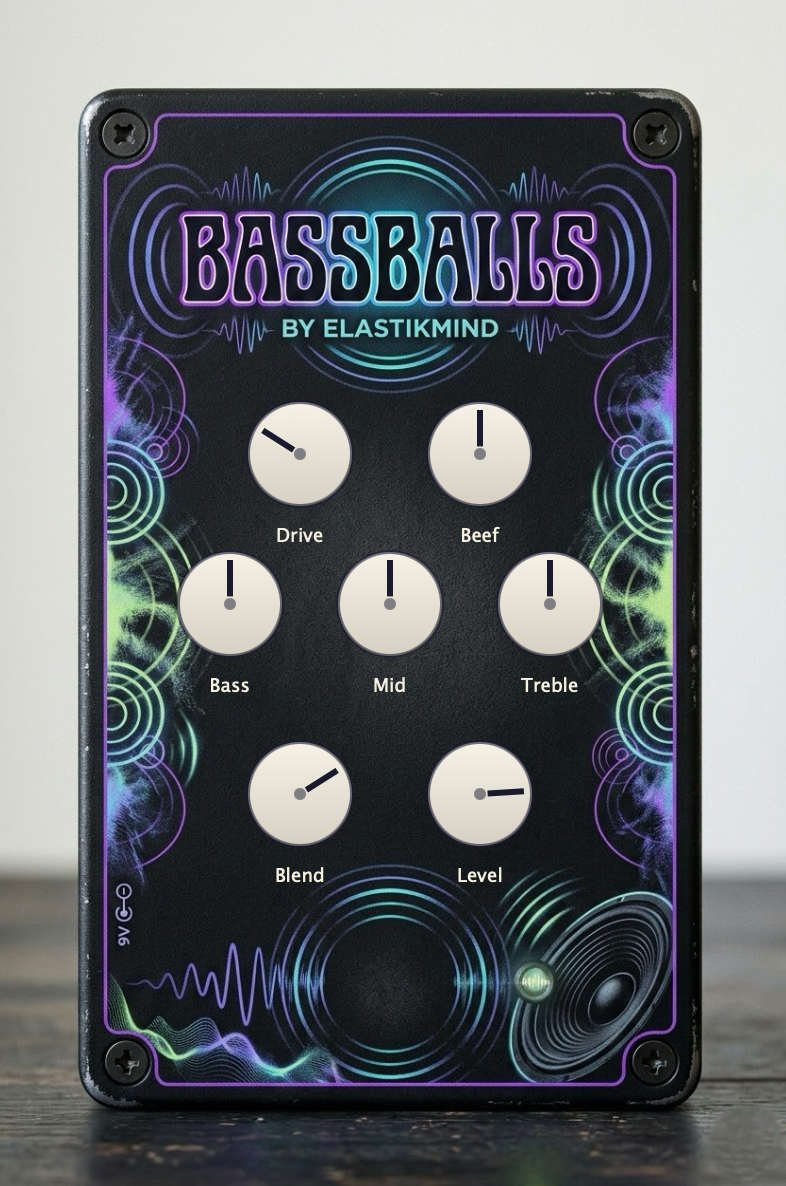
BassBalls is a professional bass guitar VST plugin for VST3, AU, and Standalone formats, modeled after the SansAmp Bass Driver DI concept. It combines drive, harmonic saturation, a precision 3-band EQ, and a dry/wet blend control to give your bass tone the beef, punch, and character that a sterile DI signal cannot deliver.
Table of Contents
- What Is BassBalls?
- Why Use a Bass Guitar VST Plugin?
- The Signal Chain
- How to Use BassBalls
- When to Use BassBalls
- Starting Points
- Key Features
- System Requirements
What Is BassBalls Bass Guitar VST Plugin?
BassBalls is a bass guitar VST plugin built with the JUCE DSP framework for bass guitar players, producers, and engineers. It processes your bass signal through a seven-stage chain — input gain, drive, beef, EQ, blend, and output level — to shape tone ranging from clean and punchy to harmonically saturated and aggressive. It runs as a VST3 or AU plugin inside any compatible DAW, or as a standalone application for direct use without a host. For a broader overview of what to look for in bass processing tools, see Sound On Sound’s guide to mixing bass.
Why Use a Bass Guitar VST Plugin?
A raw DI bass signal is flat, lifeless, and difficult to place in a mix. A dedicated bass guitar VST plugin like BassBalls gives you the same tone-shaping tools professional engineers use with outboard hardware — with no external gear required.
BassBalls is especially useful for:
- Transforming a sterile DI bass into a punchy, mix-ready tone
- Adding harmonic saturation and low-mid weight to thin bass recordings
- Sculpting bass EQ without stacking multiple plugins
- Blending processed and dry signal for parallel bass saturation
- Dialing in everything from subtle warmth to full fuzz and grind
- Shaping synth bass, upright bass, and fretless as well as electric
Understanding how bass guitar frequencies interact in a mix can help you get the most out of every knob on this plugin.
The 7-Stage Signal Chain
Every stage of this bass guitar VST plugin was designed specifically for bass frequencies. The signal flows in order through each of the following controls:
- Drive – An asymmetric soft-clip waveshaper that produces natural-sounding distortion from subtle pre-amp warmth to aggressive harmonic saturation.
- Beef – A low-mid emphasis and harmonic saturation stage centered in the 200–800 Hz range, adding body and presence to thin DI recordings.
- Bass – An 80 Hz shelf filter with ±12 dB of range for controlling the fundamental weight of your instrument.
- Mid – An 800 Hz peak filter with ±12 dB of range for carving space in the mix or pushing attack forward.
- Treble – A 4 kHz shelf filter with ±12 dB of range for adding string definition, pick attack, and presence.
- Blend – A dry/wet mix control that blends the processed signal with your original clean signal for parallel processing at any ratio.
- Level – A master output control ranging from –24 to +6 dB for gain staging within your signal chain.
How to Use BassBalls Bass Guitar VST Plugin
- Download and install BassBalls on Windows or macOS.
- Open your DAW and load BassBalls on a bass guitar track or bus.
- Set your Drive and Beef controls to establish the core character of your tone.
- Use the Bass, Mid, and Treble EQ controls to shape the frequency balance.
- Adjust Blend to mix in as much or as little of the processed signal as you need.
- Set the output Level to match the rest of your signal chain.
All seven parameters respond to automation and save with your project session.
When to Use This Bass Guitar VST Plugin
Use BassBalls at multiple points in your production workflow:
- On a recorded bass track – Shape the tone of a DI or miked recording to sit correctly in the mix.
- On a live-input bass channel – Use the standalone application to process your bass in real time without a DAW.
- During mixing – Use the Blend control to layer processed saturation over the clean signal for depth without losing transient attack.
- On synth bass – Add analog-style harmonic character to programmed or synthesized bass parts.
- During mastering or stem processing – Apply controlled low-mid emphasis and EQ to a bass stem without overprocessing.
4 Starting Points for Your Bass Guitar VST Plugin Settings
Not sure where to begin? These presets give you a solid foundation to build from:
- Punchy Studio DI – Drive 0.25 / Beef 0.5 / Bass +2 dB / Mid 0 dB / Treble +1 dB / Blend 0.8
- Driven Rock Bass – Drive 0.65 / Beef 0.7 / Bass +3 dB / Mid −2 dB / Treble +2 dB / Blend 0.6
- Warm Motown Thump – Drive 0.10 / Beef 0.4 / Bass +4 dB / Mid −3 dB / Treble −2 dB / Blend 1.0
- Fuzz and Grind – Drive 0.90 / Beef 0.8 / Bass +2 dB / Mid +1 dB / Treble +3 dB / Blend 0.5
Key Features of BassBalls Bass Guitar VST Plugin
- SansAmp-inspired drive and tone-shaping DSP
- Asymmetric soft-clip waveshaper for natural harmonic distortion
- Low-mid Beef stage with harmonic saturation
- 3-band studio EQ — Bass shelf, Mid peak, Treble shelf
- Parallel dry/wet Blend control
- Available as VST3, AU, and Standalone — a complete bass guitar VST plugin solution
- Optimized real-time DSP — lock-free and allocation-free on the audio thread
- All parameters automatable and DAW session compatible
System Requirements
- Windows 10 or later (64-bit) or macOS 10.13 or later
- A VST3 or AU compatible DAW, or use the included standalone application
- An audio interface or built-in sound device
Get Started With BassBalls
Download the BassBalls bass guitar VST plugin installer for Windows or macOS, drop it into your DAW, and start building the bass tone you’ve been chasing. Questions? Visit our support page.